
Memory
Memory stores structured JSON data on an app, scoped by namespace. It persists across runs so workflows can keep state, pass data between branches, or look up records by matching fields.
How it works
Section titled “How it works”- App-scoped — Data belongs to one app.
- Namespaces — You choose a namespace string per use case (for example
deploymentsorincidents). - Rows — Each write can add or update rows; each row holds JSON values (object).
- Matching — Read, update, delete, and upsert operations can match rows by field values (JSON containment).
Hello world example
Section titled “Hello world example”A common use case is tracking the status of an ongoing process, like an incident.
- Write: When an incident is declared, use an Add Memory node.
- Namespace:
incidents - Values:
{"id": "{{ $.trigger.incident_id }}", "status": "open"}
- Namespace:
- Read: Later in the workflow (or in a completely separate run triggered by a different event), use a Read Memory node to check the status.
- Namespace:
incidents - Match:
{"id": "{{ $.trigger.incident_id }}"}
- Namespace:
- Update: When the incident is resolved, use an Update Memory node.
- Namespace:
incidents - Match:
{"id": "{{ $.trigger.incident_id }}"} - Values:
{"status": "resolved"}
- Namespace:
Namespaces
Section titled “Namespaces”Namespaces are arbitrary strings that group related memory records. You create a namespace simply by writing to it.
Examples of namespaces:
deployments: Tracking the version, environment, and status of code rollouts.user_preferences: Storing opt-in/opt-out flags for notifications.rate_limits: Keeping counters for API usage to prevent throttling.approval_requests: Storing pending requests that wait for human interaction.
Persisting data across runs
Section titled “Persisting data across runs”Runs on the same app are independent: payloads from one run do not automatically appear in the next. Memory is where you store facts that should survive until a later run needs them.
| Pattern | How |
|---|---|
| Staged rollout | Upsert the current stage; next run Read (latest) to decide whether to advance. |
| Incident handoff | Run 1 Add IDs; Run 2 Read by key to continue the same incident. |
| Deduplication | Upsert on a stable key; branch on found / notFound. |
| Counters | Update to merge new values (e.g. attempt count); later runs read the totals. |
Components
Section titled “Components”SuperPlane provides five memory components:
| Component | Purpose |
|---|---|
| Add Memory | Append a new row in a namespace. |
| Read Memory | Find rows by namespace and match criteria; emits on found or notFound. |
| Update Memory | Update matching rows by merging new fields; emits on found or notFound. |
| Delete Memory | Delete matching rows; emits on deleted or notFound. |
| Upsert Memory | Update the first match, or insert if none match. |
Read Memory supports:
- Result mode —
all(every match) orlatest(most recent). - Emit mode —
allAtOnce(one event with all matches) oroneByOne(one event per row).
See the Components reference for field-level configuration.
Manual memory entry and edits
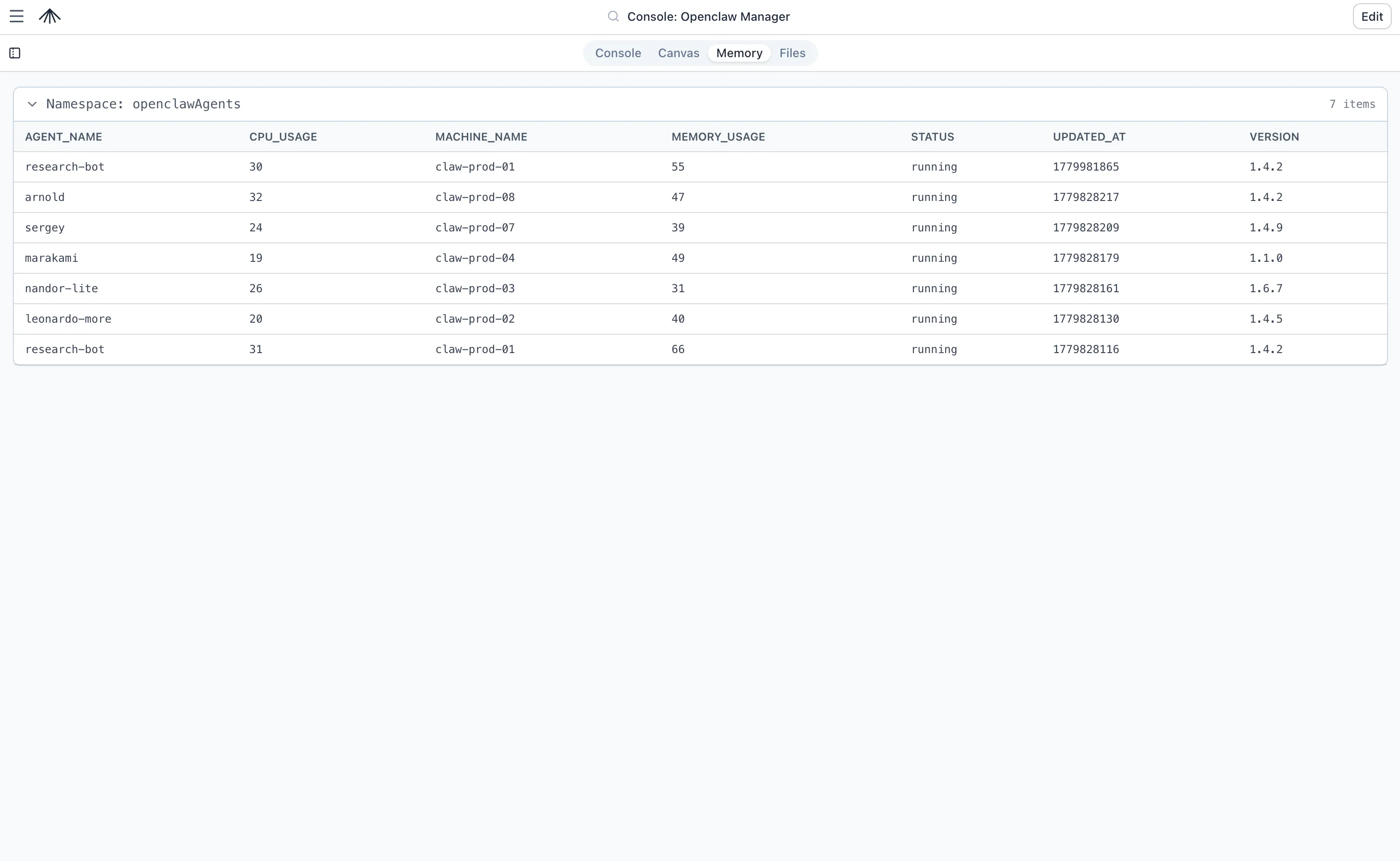
Section titled “Manual memory entry and edits”You don’t have to rely solely on workflows to manage memory. You can manually view, add, edit, and delete records directly from the SuperPlane UI.
- Open your app and navigate to the Memory tab.
- Select a namespace from the sidebar.
- Click Add Record to manually insert a new JSON object.
- Click on any existing row to edit its JSON values or delete it.
This is especially useful for seeding initial configuration data, updating feature flags, or correcting state during an incident.
Read-only behavior
Section titled “Read-only behavior”Access to the Memory tab is governed by your app permissions:
- Users with
canvases:updatepermission can add, edit, and delete memory records manually. - Users with only
canvases:readpermission will see the Memory tab in read-only mode. They can browse namespaces and inspect JSON values, but the buttons to add, edit, or delete records will be hidden or disabled.
Feeding console widgets
Section titled “Feeding console widgets”Memory is a primary data source for the Console. You can build live operational dashboards that read directly from memory namespaces.
For example, you can configure a Table widget to display the incidents namespace. As your workflows add or update memory records, the console table updates in real-time. You can also reference memory variables directly in Markdown widgets to display dynamic text (e.g., {{ memory.incidents.length }} open incidents).
See Console Data Sources for more details.
CLI and API
Section titled “CLI and API”You can list and export memory records using the SuperPlane CLI. This is useful for auditing, backups, or piping data into other scripts.
List all memory records for an app:
superplane apps memory list <app_id>Filter records to a specific namespace:
superplane apps memory list <app_id> --namespace "incidents"Memory can also be managed via the REST API (see Public API Reference). Managing memory records requires permissions to read or update the app.